We available for hire! — Need help with a web or mobile project?
From yensdesign we develop technology projects based on web apps, mobile apps, consulting and databases. We are young and hard workers, passionate about innovation and focused in new technologies.If you want to ask for a budget, we hare available for hire!.
How to Validate Forms in both sides using PHP and jQuery
 January 13th, 2009
Hi guys and welcome to a new tutorial of yensdesign.com! Some of you ask us about the possibility of create a tutorial about how to validate forms in server side (using PHP). So i wrote a tutorial about it, adding some interesting features with jQuery:
We are going to learn how to validate your forms using PHP and jQuery in both sides: client side (using javascript with jQuery) and server side (using PHP). It will be interesting to see how to use regular expressions to validate different kind of e-mails, passwords and more.
As always, here you have a preview of what we are going to do:
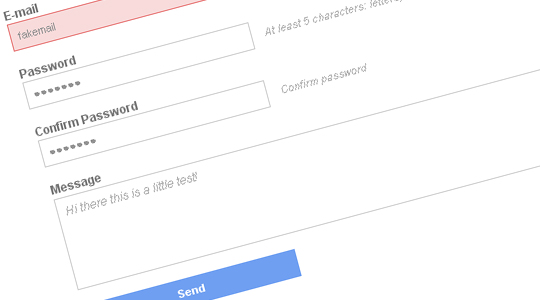
You can try the living example before continue reading the tutorial. Remember that if you want to try the server side, you need to disable javascript in your web browser!
Tested in: Firefox, Internet Explorer 6 & 7, Opera, Safari & Chrome.
Let’s learn guys!
Introduction
As you know, we are asking you wich tutorials do you want to see in yensdesign and as i told you, you can send us more suggestions and feedback in our forums.
On of these suggestions is about how to validate forms in server side using PHP, so in this tutorial we will make use of PHP and jQuery to validate all fields in both sides:
- Client side: Using javascript with jQuery.
- Server side: Using PHP.
We will make use of regular expressions and if you don’t know about them, you will notice very soon their power. By the way, you can check out this source to learn more about regular expressions in different languages.
At the end of the tutorial, we will get a final real working example that will validate our fields with / without javascript enabled, but always making use of the server side validaton.
Let’s dive into the tutorial!
Step 1: First approach to the xHTML Layout
In this case we will create a simple HTML layout showing our form. In a first approach the HTML will look like this:
[code language="html"] [/code]
Registration process
- Invalid Name: We want names with more than 3 letters!
- Invalid E-mail: Stop cowboy! Type a valid e-mail please

- Passwords are invalid: Passwords doesn't match or are invalid!
- Ivalid message: Type a message with at least with 10 letters
- Congratulations! All fields are OK

As you can see we have created all divisions that will appear (or not) in our tutorial. Some of these divisions won’t be visible as default, but we will add some conditionals in PHP and CSS to get this. So these are the divisions:
- #container: contains all divisions
- #error: contains a list of possible errors after submitting the form
- #error.valid: contains the “congratulations phrase” if all it’s OK
- #customForm: contains our form
So now we have our xHTML layout ready let’s add some style with CSS.
Step 2: Adding style with CSS
It will be fast guys, just take a look at the general.css code:
[code language="css"]
@CHARSET "UTF-8";
/******* GENERAL RESET *******/
html, body, div, span, applet, object, iframe, h1, h2, h3, h4, h5, h6, p, blockquote, pre, a, abbr, acronym, address, big, cite, code, del, dfn, em,
font, img, ins, kbd, q, s, samp, small, strike, strong, sub, sup, tt, var, dl, dt, dd, ol, ul, li, fieldset, form, label, legend, table, caption, tbody,
 tfoot, thead, tr, th, td {
border:0pt none;
font-family:inherit;
font-size: 100%;
font-style:inherit;
font-weight:inherit;
margin:0pt;
padding:0pt;
vertical-align:baseline;
}
body{
	background: #fff;
	line-height:14px;
	font-size: 12px;
	font-family: Arial,  Verdana, Helvetica, sans-serif;
	margin:0pt;
	cursor:default;
	overflow: hidden;
}
html,body{
	height:100%;
	text-align: center;
}
.clear{
	clear: both;
	height: 0;
	visibility: hidden;
	display: block;
}
a{
	text-decoration: none;
}
strong{
	font-weight: 700;
}
/******* GENERAL RESET *******/
h1{
	font-weight: 700;
	font-size: 18px;
	line-height: 1.2em;
	border-bottom: 1px dotted #6b9ef1;
	color: #5f95ef;
	margin-bottom: 1em;
}
/******* LOGO *******/
#logo{
	margin-top: 1em;
	display: block;
}
/******* /LOGO  *******/
/******* CONTAINER *******/
#container{
	width: 600px;
	margin: 40px auto;
	text-align: left;
}
/******* /CONTAINER *******/
/******* FORM *******/
#customForm{
	padding: 0 10px 10px;
}
#customForm label{
	display: block;
	color: #797979;
	font-weight: 700;
	line-height: 1.4em;
}
#customForm input{
	width: 220px;
	padding: 6px;
	color: #949494;
	font-family: Arial,  Verdana, Helvetica, sans-serif;
	font-size: 11px;
	border: 1px solid #cecece;
}
#customForm input.error{
	background: #f8dbdb;
	border-color: #e77776;
}
#customForm textarea{
	width: 550px;
	height: 80px;
	padding: 6px;
	color: #adaeae;
	font-family: Arial,  Verdana, Helvetica, sans-serif;
	font-style: italic;
	font-size: 12px;
	border: 1px solid #cecece;
}
#customForm textarea.error{
	background: #f8dbdb;
	border-color: #e77776;
}
#customForm div{
	margin-bottom: 15px;
}
#customForm div span{
	margin-left: 10px;
	color: #b1b1b1;
	font-size: 11px;
	font-style: italic;
}
#customForm div span.error{
	color: #e46c6e;
}
#customForm #send{
	background: #6f9ff1;
	color: #fff;
	font-weight: 700;
	font-style: normal;
	border: 0;
	cursor: pointer;
}
#customForm #send:hover{
	background: #79a7f1;
}
#error{
	margin-bottom: 20px;
	border: 1px solid #efefef;
}
#error ul{
	list-style: square;
	padding: 5px;
	font-size: 11px;
}
#error ul li{
	list-style-position: inside;
	line-height: 1.6em;
}
#error ul li strong{
	color: #e46c6d;
}
#error.valid ul li strong{
	color: #93d72e;
}
/******* /FORM *******/
[/code]
As always we make use of our cool CSS reset snippet and add some interesting parts to the specific tutorial.
Just notice that we have defined some .error classes that we will use in the jQuery part to make our tutorial a little more cool and friendly user

Next part, the javascript validation!
Step 3: Validation in the client side with jQuery
Yeah guys, because it could not be otherwise we will use jQuery to make the validation part in the client side. We will add / remove some .error classes to make our form a little more intuitive for the final user.
So first of all, remember that all the following code will be in the $(document).ready() of jQuery and all will be a part of the javascript file named validation.js (original, uh?).
So let’s save references to some DOM elements that we will often:
[code language="javascript"]
//global vars
var form = $("#customForm");
var name = $("#name");
var nameInfo = $("#nameInfo");
var email = $("#email");
var emailInfo = $("#emailInfo");
var pass1 = $("#pass1");
var pass1Info = $("#pass1Info");
var pass2 = $("#pass2");
var pass2Info = $("#pass2Info");
var message = $("#message");
[/code]
As you may notice, all references are form related.
Now let’s define our validation functions that will help us in the validation process:
- validateEmail(): we only allow valid emails!
- validateName(): we only allow names with more than 3 letters
- validatePass1(): we only allow passwords with at least 5 characters
- validatePass2(): we only allow it if passwords are equal
- validateMessage(): we only messages with more than 10 letters
[code language="javascript"]
function validateName(){
	//if it's NOT valid
	if(name.val().length < 4){
		name.addClass("error");
		nameInfo.text("We want names with more than 3 letters!");
		nameInfo.addClass("error");
		return false;
	}
	//if it's valid
	else{
		name.removeClass("error");
		nameInfo.text("What's your name?");
		nameInfo.removeClass("error");
		return true;
	}
}
function validatePass1(){
	var a = $("#password1");
	var b = $("#password2");

	//it's NOT valid
	if(pass1.val().length <5){
		pass1.addClass("error");
		pass1Info.text("Ey! Remember: At least 5 characters: letters, numbers and '_'");
		pass1Info.addClass("error");
		return false;
	}
	//it's valid
	else{
		pass1.removeClass("error");
		pass1Info.text("At least 5 characters: letters, numbers and '_'");
		pass1Info.removeClass("error");
		validatePass2();
		return true;
	}
}
function validatePass2(){
	var a = $("#password1");
	var b = $("#password2");
	//are NOT valid
	if( pass1.val() != pass2.val() ){
		pass2.addClass("error");
		pass2Info.text("Passwords doesn't match!");
		pass2Info.addClass("error");
		return false;
	}
	//are valid
	else{
		pass2.removeClass("error");
		pass2Info.text("Confirm password");
		pass2Info.removeClass("error");
		return true;
	}
}
function validateMessage(){
	//it's NOT valid
	if(message.val().length < 10){
		message.addClass("error");
		return false;
	}
	//it's valid
	else{
		message.removeClass("error");
		return true;
	}
}
[/code]
As you can see, we are adding and removing .error classes and changing text values if needed to show the user what fields are wrong.
Now we have defined all validation functions, we only need to manage events. Here you have what we are going to do:
- Validate the name field in: blur and keyup events.
- Validate the email field in: blur event.
- Validate the password fields in: blur and keyup events.
- Validate the message field in: blur, and keyup event.
- Validate all fields in: submit form event.
Therefore the code would be:
[code language="javascript"]
//On blur
name.blur(validateName);
email.blur(validateEmail);
pass1.blur(validatePass1);
pass2.blur(validatePass2);
//On key press
name.keyup(validateName);
pass1.keyup(validatePass1);
pass2.keyup(validatePass2);
message.keyup(validateMessage);
//On Submitting
form.submit(function(){
	if(validateName() & validateEmail() & validatePass1() & validatePass2() & validateMessage())
		return true
	else
		return false;
});
[/code]
As you can see, it's very easy to control whatever we want by using jQuery and some functions. So now that we have done the cliend site, let's move to the server side!
Step 4: Validation in the server side with PHP
Now that we have the client side done, let's use the power of PHP to complete our tutorial.
Some of you may think that we don't need the server side validation but it's a big error thinking about it. Remember that we can't trust in the client side. In example: users can disable javascript in their browsers and send us undesired values.
So first of all we must create a new .php file named validation.php that will contains our validation functions written in PHP:
[code language="php"]
 5;
	}
	function validateMessage($message){
		//if it's NOT valid
		if(strlen($message) < 10)
			return false;
		//if it's valid
		else
			return true;
	}
?>
[/code]
As you can see we have defined 4 functions:
- validateName(): checks if name has at least 4 letters
- validateEmail(): checks if email is valid
- validatePasswords(): checks if passwords are equal and have at least 5 letters
- validateMessage(): checks if message has at least 10 letters
It's almost done guys, we only need to add some conditionals to our index.php. If you remember, we said that we are going to add some conditionals in the PHP, so it's time to do that:
- We will display #error division only if there are at least one error.
- We will display #error.valid division only if all fields are OK.
So here you have the final index.php layout:
[code language="php"][/code]Registration process
- Invalid Name: We want names with more than 3 letters!
- Invalid E-mail: Stop cowboy! Type a valid e-mail please
- Passwords are invalid: Passwords doesn't match or are invalid!
- Ivalid message: Type a message with at least with 10 letters
- Congratulations! All fields are OK
As you can see we have included the validation.php file before call our validation functions and added some calls to our validation functions to check fields when form is submited.
We have used short notation PHP in conditionals to keep the HTML cleaner and easier to read.
We are showing errors / "congratulations phrase" as needed and now you only need to know what are you doing to do with this validated values
Step 5: Testing our Validated Form!
That's all guys, I hope you find it useful and use this tutorial to improve a little more your websites.
Remember that if you want to try the server side, you need to disable the javascript in your web browser. In Firefox it's in Tools > Options > Content uncheck the "Enable Javascript" checkbox.
You can try the tutorial online here to see how It is working and download here all sources.
Remember that you can solve your doubts in our forums and follow os on Twitter to know more about what are we doing in any moment!
See you on next tutorial and remember that we want you suggest tutorials to write!
One more thing...
Guaranteed pass 642-873 exam by using 646-363 exam resources prepared by 83-640 certified professionals at certkiller.
 forms, javascript, jquery, php, tutorial, Tutorials, validate, Web Design
 Coding, Tutorials, Web Design
Enjoy this post?
Your vote will help us to grow this website and write more entries like this one :)


We available for hire! — Need help with a web or mobile project?
From yensdesign we develop technology projects based on web apps, mobile apps, consulting and databases. We are young and hard workers, passionate about innovation and focused in new technologies. We try to help you, sharing our knowledge acquired on worked projects, while helping the community and showing our capabilities.If you want to ask for a budget, we hare available for hire! Don't doubt in get in touch with us!.





honestly: fucking horrible.
shitty (x)html, shitty css, shitty javascript and shitty php.
stop writing articles, please.
@thr Thanks for posting and for the feedback!
The living demo has passed the XHTML 1.0 Transitional and the CSS code has passed the 2.1 validation! So shit goes to the javascript and the php code only hehe.
Sorry but I will continue posting tutorials ^_^
Where are the Javascript validation functions? The php ones are posted twice.
@me Thanks for posting! Fixed!
@adrian Mato Gondelle: Even though I wasn’t too interested in this tutorial (as my framework -code igniter- handles pretty neat php responses, I just wanted to thank you for all your tuts (in contrast to the first commenter). This blog is one of the few each year which made it to my homepage and I am planning on integrating another tut in my open source project blogora.
Thanks a lot
@David Thank you so much for your comment! I understand that somebody doesn’t like my tuts, but the goal of theme are share my little knowledge about webdesign and coding and I love to see people using them for their personal projects
Wait, you’re dutch and from hilversum…!?!?! (based on the text on your dark elegance theme thing… I hope I am right because your facebook is spanish and you aren’t listed in “de telefoongids”)… Nja, heel veel success en I hope I am not messing up some facts currently.
Echt een prachtige site en echt heel veel succes met al je projecten en overtuig je baas dat er wat moet veranderen aan de website van mediamonks. Ik loop dagelijks van en naar station hilversum en daar ergens is mediamonks ook gevestigd volgens mij
Toch wel leuk om nog zo nu en dan een nederlander tegen te komen op het internet :P
:P
@David Mulder hahaha noooo! It’s a copy paste from other site to fill the divisions! ^_^”
[...] How to Validate Forms in both sides using PHP and jQuery | yensdesign – Tutorials, Web Design and Co… Validate forms with jQuery AND PHP (tags: webdesign tutorial CSS usability jQuery html coding php) [...]
its nice but u should make as Ajax thing, i mean the response, u have added only validation, hope next article will be Ajax response.
by they way, better not to make unwanted comments
@Yoosuf Thanks for posting!
It is NOT AJAX! We are only using javascript to validate the form!
Hola Adrián:
Tu blog está genial, no hagas caso de comentarios de gente que no entiende.
Sólo decirte que el código javascript de validación no aparece. Aparece 2 veces el código php.
En otro mensaje anterior dices que lo has corregido, pero sigue saliendo
1 saludo!
@Rekeb Thanks for posting!
Arg! I was sure I have fixed the problem with javascript code! Now it’s fixed
@Adrián Mato Gondelle: Saying that the code is ‘ok’ b/c it passes validation just shows how little you know about this stuff, allow me to elaborate on WHY the four parts are shitty:
(x)html: It contains markup which isn’t used on every request, for example the error/ok-validation-feedback-blocks should be rendered using pure javascript, what happens when someone without js/css-availability (for example: people with disorders or google-bot) goes into this site? They will see the error messages at the top first and think they did something wrong.
css: Admittedly this is the ‘least bad’ of the four code segments, but over-abuse of IDs and using of IDs where it doesn’t make sense (for example the #error id should probably be a class)
javascript: using global variables, and it even seems as if you forgot to add parts of the javascript code? since the php-validation-code is on both the “client” and “server” parts of validation, also the javascript is horribly static requiring editing of the validation code for every new element you add, sigh.
php: intermixed with the (x)html putting validation logic in the template, using the now deprecated ereg-functions, the regex for the email is just HORRIBLE and doesn’t even account for close to all possible emails.
php+javascript: You seem to be duplicating the validation logic on both the client and server, redundant work.
All in all: HORRIBLE CODE.
@thr Thanks for posting one more time, but it seems you haven’t read the tutorial or don’t understand what is going on.
You said: “just shows how little you know about this stuff”, “php+javascript: You seem to be duplicating the validation logic on both the client and server, redundant work.”
- You are completily wrong! It’s VERY IMPORTANT do that “redundant” work, because if you don’t know, clients (as we said in the tutorial) can disable the javascript code in webpages and make whatever they want in your database without validation
- In the other hand, you are completily wrong at your interpretation about google bot. If you check the code, we test via PHP if someone submitted the post, so you are wrong.. one more time
- About the javascript… we don’t pretend to create a plugin or something like that, just show how to validate a form hehe
- The PHP is interlined with the xHTML to make the tutorial easier to write and explain, because we are not learning about how to applicate a MVC in each tutorial, that’s all.
By the way, I am not saying that it has the best practices in web development, it’s a tutorial to “show the way” to understand some concepts.
Thanks for the feedback anyway, it’s important to know all opinions of readers
El tutorial me ha venido genial para validar unos formularios con jQuery. Yo en lugar de usar PHP uso JSP, pero asi mismo, es un trabajo impecable. Muchas gracias!!
1 saludo!!
@Rekeb Thanks one more time!
Remember you can download directly all ours tutorials at the end of the posts to check all the files working
Hey adrian awesome site, im having trouble, im trying to add a field for phone numbers but having trouble with the regex.
@Jaswinder Thank you so much!
Here you have this snippet, hope it helps you http://snippets.dzone.com/posts/show/597
[...] How to Validate Forms in both sides using PHP and jQuery … [...]
@thr – you’re certainly incorrect in saying that the duplicated validation is redundant – a point I’m suprised at considering you comments concerning accessibility earlier.
Whilst the Javascript and PHP here might not be coded as you like, the principle is correct – client side validation to provide an instant feedback mechanism. Server side validation to do the real, essential work.
If you think for one minute that client side validation is sufficient then your PHP code has far more fundamental problems than simply being mixed with (X)HTML.
[...] How to Validate Forms in both sides using PHP and jQuery [...]
I was kind of hoping to see unified validation.
The problem with your approach is that if you update the validation on, lets say name length, you must change the client-side and server-side code, which inevitably will lead to bugs on one side or the other, or just plain inconsistencies.
I like to follow DRY principles where possible.
I’m not sure how -best- to solve that problem.
@Luke Interesting thought, but I don’t find any solution to this problem… It seems inevitable.. or not, anyone knows? :S
Its good that someone has gone into this subject. I am all for giving immediate feed back on the validity of a form.
However, the method described above is but one of oh 1374 ways that it could be done.
I personally would use arrays and jQuery ajax. The problem with the above is that certain code algorithms are being repeated over and over again. Think about it…
have an array:
$regexs['first_name'] = “^….*$”;
$regexs['name'] = “^….*$”;
$regexs['email'] = “^[super fun regular expression for email checking]*$”;
… etc …
$errors['first_name'] =”First names must be atleast 3 chars… sorry Asian people”;
$errors['name'] =”First names must be atleast 3 chars… sorry Asian people”;
$errors['email'] =”Please give a real email address”;
… etc …
Then using foreach loops you can wrap the validation and present errors into one function. You can also ajax the inputs so that all validation is done in PHP which has superior regular expression tools than Javascript. The method above uses ALOT of repetitive writing and coding.
Tomato, Tomato the end result should be live real time input validation to help the user fill in the forms nicely.
Kudos for the post.
@Rob Yeah, I am totally agree with you, but as in other tutorials I try to keep it simple to let all kind of people understand the tutorial. Begginers will understand it fast and more experienced users can think about how to optimize the “concept” just that.
Thanks for posting!
[...] YensDesign blog has a recent post that steps you through the entire process (down to every detail in the code) of making a form [...]
How can I connect a mysql database to this form?
@snarf Hi thanks for posting! You must use the mysql provided in the tutorial, to create the table. Then you must change first lines of the php file to connect to your database.
Good luck!
Hi Adrian,
Thanks for getting back so quick.
Had another scan of all the code, and there is no mention of a connection to mysql!!!!
I am sorry snarf! I was thinking about other tutorial! In this tutorial there is only the validation in 2 sides but nothing about databases, right?
You can check this tutorial about creating a shoutbox tutorial with php and mysql and see how do a connection to a mysql database, and more: http://yensdesign.com/2009/01/create-a-shoutbox-using-php-and-ajax-jquery/
Thanks Adrian
Hi, about the quality of the code, for demonstration purposes it fits perfectly.
There’s plenty of tutorials about good semantic xhtml and about compact clever css.
There’s other places to learn javascript, jQuery or PHP.
The concept being explained, is indeed explained clearly.
The question about double validation… well there are at least 2 waysto solve the problem:
1 – Write php code (one time) that generetes the validation on the client side and the validation on the server side, this way maintenace must always be on one place, the generator!
2 – Try Jaxter, the javascript server, this way you can reuse javascript validation code on both sides, maintenace is done only in one place also. (I haven’t tried Jaxter, but that’s exacly one the key benefits of having a javascript server.
Keep up the tutorials!
@luis good point! Thank you so much for share that with us!
[...] How to Validate Forms in both sides using PHP and jQuery … [...]
[...] See the rest here: How to Validate Forms in both sides using PHP and jQuery … [...]
[...] 4 – How to Validate Forms in both sides using PHP and jQuery [...]
[...] How to validate forms using jQuery & PHP [...]
Thanks for the tutorial. Really Nice work. Do you have anything that covers interacting with a database via AJAX/PHP without refreshing page content?
It’s good to know that some people still find time to work on tutorials like these.
Thanks again.
Good tutorial but very rough around the edges. The email validation method for the java side is not even shown, I had to go to the full source to find it. Also, the presented code doesn’t always cooperate with IE, and for that reason, I removed the shortcut variables you used to make things run smoothly. Additionally, there is a typo in the php code presented, in the password validation method, it should be >= 5, not > 5 Other than that, a very good tutorial.
Thank you for posting this.
Its help me a lot
Fine info… I’ll use it… thanks
helped me perfectly with what I needed. Clear and very easy to follow. Cheers!
Question about writing the request I wrote the $.ajax() code but am not sure where to put it. Right now if have it in if(validateEmail()){$.ajax()…..} but not working. Is this request wrong or is it in the wrong place? Thanks
$.ajax({
type: “POST”,
url: “bin/process.php”,
data: dataString,
success: function() {
$(‘#contact_form’).html(“”);
$(‘#message’).html(“Contact Form Submitted!”)
.append(“We will be in touch soon.”)
.hide()
.fadeIn(1500, function() {
$(‘#message’).append(“”);
});
}
});
http://docs.jquery.com/Ajax/jQuery.ajax
[...] How to Validate Forms in both sides using PHP and jQuery [...]
Hi,
Thanks for tut. This is exaclty what I was looking for! both sides….
good job…
PS. If someone done like it …. well not everyone have to use it espacially when they dont like it
And CSS or JS and php code can be presonalized… its just an idea and not copy / paste …
I guess thats the whole point of tutorials
Good job
[...] 16. How to Validate Forms in both sides using PHP and jQuery [...]
It would be good when writing a tutorial to use best practices.
I agree with other posters here, the duplication of the validation is a bit annoying, it would be better to come up with a DRY way of doing this, and that’s what I was expecting when I clicked this link.
Also, all those global variables in javascript are terrible. There is no reason for that all. A global variable called “name”?? You’re looking for trouble here. The least you could do is wrap those all in an object.
Keep in mind that you might post a tutorial for people to get the “basic idea” but there will be plenty of people that copy the code exactly as it’s written, so it would be best to have the proper standards applied.
Oh, by the way no reason to use a Transition doctype, doctype should be Strict.
Transitional was only good for one thing, exactly what it says…when a site was in transition from one doctype to another. Anything brand new should always be strict.
thanks so much
[...] How to Validate Forms in both sides using PHP and jQuery (tags: jquery php validation forms tutorial) [...]
[...] How to Validate Forms in both sides using PHP and jQuery | yensdesign – Tutorials, Web Design and Co… (tags: coding howto php development javascript tutorials programming jquery validation) [...]
[...] How to Validate Forms in both sides using PHP and jQuery [...]
I love the tutorial im try to figure out how to validate different forms on the same page thanks
[...] 16. How to Validate Forms in both sides using PHP and jQuery [...]
Hi! Thanks for a great tutorial. Is it possible to use mail()? Can you please show me an example where to put the mail() code?
Best regards Randy
mate, thanks a lot for this tute. I see that most replies to you are positive, which is great. Those that are negative should keep their options to themselves- if they feel they can do better then they should go and do that. Your effort is much appreciated.
Thanks again!
Regards, Adam
I don’t give a s**t what others say,
when people like your-self go out there way to help others by providing useful information like this its always worth a thanks.
keep up the good work m8.
Thumbs up
The email validation part can generate false negative checks.
For example, the website http://www.nn.hr is absolutely valid (Croatian goverment publications) , and email “[REMOVE_SPAM_][email protected][REMOVE]” (remove stuff inside brackets) is valid also, but doesn’t pass though your validation form :/
Nice tutorial. For those who are in to regular expressions, then rewriting the basics shouldn’t be a problem.
One small problem – the form as displayed in FF3.1b3 with web developer and tab toolbars creates page overflow if multiple error messages are displayed, so you need -
html, body {
overflow:auto
}
in the css.
@thr & JeffL – The purpose of a tutorial is not to spoon feed people, but to arm them with information that can make them think of solutions for their own circumstances. In this case, the php might not be the way I would do it, the css is definitely not the way I would do it and the java is probably not exactly the way I would do it either… but all three parts combined have given me an insight into how to solve a problem that I have been having. If someone is lazy enough to cut and paste and use that professionally, then they shouldn’t be in the game in the first place.
@Adrian – Thanks for the tips. You have made my life today far easier than it was going to be.
I agree with the first poster. Repetition, too much hard coding, limited to “simple” forms, etc. etc. And there is more to XHTML and CSS then passing a validation test, semantics in particular.
correct the code php there is one small error
function validatePasswords($pass1,$pass2) {
//if DOESN’T MATCH
if(strpos($pass1,’ ‘) !== false)
return false;
//if are valid
return $pass1 == $pass2 && strlen($pass1) >= 5;
}
[...] 16. How to Validate Forms in both sides using PHP and jQuery [...]
[...] 16. How to Validate Forms in both sides using PHP and jQuery [...]
Tio, el ingles de uno de nosotros dos esta muy mal “paswords doESn’t match”. Espero que sea el tuyo
Me ha ayudao mucho esto y lo del webos (aunque mola mas el mio) y me ha servido para la clase de informatica (tengo a un garrulo que dice usar la tablas pa organiozar las cosas en el front page).
Desgraciadamente esperaba algo de ajax.
Igualmente muy buen trabajo y gracias.
Ahora solo queda que no seas español pero me da pereza a estas horas
[...] How to Validate Forms in both sides using PHP and jQuery [...]
[...] 8. How to Validate Forms in both sides using PHP and jQuery [...]
very intersting
nice job
“….but I don’t find any solution to this problem… It seems inevitable.. or not, anyone knows?….”
a php function that serves both client (via ajax) and server side requests…here is just a few snippets of how I accomplished this…
$(document).ready(function(){
$(“.validate”).blur(function(){
var el = $(this);
$.ajax({
type: ‘POST’,
url: ”,
data: { action: ‘validate’, rule: el.attr(‘id’), value: el.attr(‘value’) },
async: false,
success: function(valid) {
el.next(‘span’).remove();
if(valid) {
el.after(”) ;
el.css( ‘background-color’, ‘#FFFFFF’ );
} else {
el.after(”);
el.css( ‘background-color’, ‘#FFFF99′ );
}
},
});
});
});
function validate($rule,$value) {
global $web_path;
$valid = TRUE;
$invalid = FALSE;
switch($rule) {
case “url”:
$output=(filter_var($value, FILTER_VALIDATE_URL)) ? $valid: $invalid;
break;
}
return $output;
}
[...] 8. PHP + jQuery表单验证 [...]
[...] Aqui el enlace. [...]
if you want a simple validate just try to read this code :
/* return a string where left & right spaces are removed */
function trim(s){ return s.replace(/^\s*|\s*$/g,”"); }
/* true if ‘s’ is a 4 digit year, false if not */
function isYear(s){ return (s.search(/^\d{4}$/) == -1) ? false:true; }
/* true if ‘s’ is empty, false if not */
function isEmpty(s){ return (trim(s).length > 0) ? false:true; }
/* true if ‘s’ is a valid email address, false if not */
function isEmail(s){ return (trim(s).search(/^\w+([\.-]?\w+)*@\w+([\.-]?\w+)*(\.\w{2,3})+$/) == -1) ? false:true; }
/* true if ‘s’ is in date format, false if not! ex: 01-01-2004, 1-1-2004, 01-1-2004 – all valid format */
function isDateFormat(s){ return (trim(s).search(/^(\d{1,2})(-)(\d{1,2})(-)(\d{4}$)/) == -1) ? false:true; }
/* true if ‘s’ is a valid date value, false if not */
function isDateValid (s){
var ar = s.split(“-”);
var m = parseInt(ar[0],10) – 1, d = parseInt(ar[1],10), y = parseInt(ar[2],10);
var dD = new Date(y,m,d);
return ((d==dD.getDate()) && (m==dD.getMonth()) && (y==dD.getFullYear()));
}
/* true if ‘s’ is a number (w/ or w/out unary +/-, w/ or w/out a dot), false if not! ex: 100, 10., 100.99 */
function isNumber(s){ return (trim(s).search(/^([+-]{0,1}\d{1,}([.]{0,1}\d*)*)$/) == -1) ? false:true; }
/* true if ‘s’ is a whole number (w/ or w/out unary +/- symbol), false if not */
function isWholeNumber(s){ return (trim(s).search(/^([+-](\d+)|(\d+))$/) == -1) ? false:true; }
/* true if ‘s’ is valid password (only all of these [0-9,a-z,A-Z,_-]), false if not. */
function isPasswordCombinationValid(s){
if(s.search(/^([-_a-z\d]+)$/i) == -1) return false; /* only these [0-9,a-z,A-Z,_-] */
if(s.search(/[a-z]/i) == -1) return false; /* letters */
if(s.search(/\d/) == -1) return false; /* digits */
if(s.search(/[-_]/) == -1) return false; /* _ & – */
return true;
}
/* true if ‘s’ is a valid user id (only any combination of these [0-9,a-z,A-Z,_]), false if not */
function isUserIdCombinationValid(s){ return (s.search(/^([_a-z\d]+)$/i) == -1) ? false:true; }
/* true if ‘s’ is in the format (99)999-999 */
function isTel_Fax(s){ return (s.search(/^([(])(\d{1,2})([)])(\d{3,3})(-)(\d{4,4})/) == -1) ? false:true; }
/* true if ‘s’ is a valid program code (only any combination of these [0-9,a-z,A-Z,_]), false if not */
function isProgCodeCombinationValid(s){ return (s.search(/^([_a-z\d]+)$/i) == -1) ? false:true; }
[...] 16. Как проверить форму с двух сторон (пользовательской и
[...] How to Validate Forms in both sides using PHP and jQuery | yensdesign – Tutorials, Web Design and Co… [...]
Very good brother! Fantastic script AJAX. And… thr, you are ridiculous, the script is perfect … redundant is your face, noob! =P
By XandynN
This is great but can you expand for us beginners how to send it to we just add it to the action “”?
Or do we have to add it after the validation.php :S
Nice one. One thing though.. The live example doesn’t allow some valid email adresses, specifically ones containing a plus sign.
@adrian (and Steve)
I won’t say your article is shit*y, but it sure is superficial. Only true beginners will learn something, and I’m afraid they’ll have to get rid of it later.
You thought that thr was wrong when he sayed that writing validating code both in Js and PHP was wrong. But he didn’t say that you needn’t validate with both, just avoid _writing_ both. Haven’t you ever heard of PEAR::HTML_QuickForm in the past 10 years or so? Or ever used any JS-HTML helpers in a recent PHP framework?
A tutorial has to simplify things, but it also has to point toward good pratices and further references. You seem to lack the culture that would allow you to write interesting articles. Sadly, most bloggers write about subjects they don’t master at all.
Please, try to run a simple spell check before posting a document like this. Poor grammar and spelling errors make this tutorial hard to follow. I am not condemning your knowledge in the subject area, but your lesson is difficult to grasp when your message lacks care. A simple program like MS Word usually does the job. Thanks.
Hey, first thanks for this article. There are probably some stuffs that could be optimized, but i sincerely think this helps (at least for beginners like me)! So thr or Rogo you should maybe tell us about what YOU wrote before criticizing.
I have a question about this, could you help about this :
I have a group of radio button for Gender select (are you a man or a woman).
I want to check if one of those 2 radio buttons is checked but i can’t succeed, i really need help.
Which is the syntax ?
Do the both radio button must have same or different ID ?
Help would be really appreciated…
Hi,
It all worked for me.
I just have one question, is it possible to add a code tot validation.php so that you recieve the form as an email?
If so, what is that code?
(I do not know much about php so don’t be harsh…)
Thanks
Is this post closed?
If not, I would like an anwer to my question:
“I just have one question, is it possible to add a code to validation.php so that you recieve the form as an email?
If so, what is that code?”
(I do not know much about php so don’t be harsh…)
Thanks
Muito bom !!!vou testar agora !!!
[...] referred from these links…. http://yensdesign.com/2009/01/improving-search-boxes-with-jquery/ http://yensdesign.com/2009/01/how-validate-forms-both-sides-using-php-jquery/ the complete code looks like this… [...]
[...] create a username and email check. That was a great moment…(wipes away a tear). Thanks to yensdesign.com, Roshan’s Blog and the [...]
Hey Brother… i just want to say thanks for the tutorial it was great. but i just want to suggest one thing, that is Please make this tutorial a video. it’s nicer if it’s in a video format. Keep up your good work…
Can i use your work… For non commercial uses of course
thanxxx i like it
Hi,
The tutorial was really a cool. The basics are very clearly penned out. Thanks a ton for such a wonderful tutorial.
GREAT PIECE OF WORK…..HOWEVER SEEMS TO HAVE NO BETTER SERVERSIDE VALIDATION WITH JAVASCRIPT ENABLED..
HOPE U GUYS WILL COME UP WITH IT……
Hello,
Thanks a lot for this. It really is a good starting point for me.
All I need now is a mail function. Is there any way you, or someone, could show how to send this to email with php?
Thanks once again.
[...] How to Validate Forms on both sides using PHP and jQueryShows how to implement both client-side and server-side validation using PHP. [...]
[...] How to Validate Forms on both sides using PHP and jQueryShows how to implement both client-side and server-side validation using PHP. [...]
[...] How to Validate Forms on both sides using PHP and jQueryShows how to implement both client-side and server-side validation using PHP. [...]
[...] How to Validate Forms on both sides using PHP and jQuery Shows how to implement both client-side and server-side validation using PHP. [...]
[...] How to Validate Forms on both sides using PHP and jQueryShows how to implement both client-side and server-side validation using PHP. [...]
[...] How to Validate Forms on both sides using PHP and jQuery Shows how to implement both client-side and server-side validation using PHP. [...]
the email validation is not in the javascript here at the tutorial
thanx buddy.
ur tutorials are really helpful for novice web develepors.
i found them very helpful and easy to understand.
please come up with some more jquery examples..
thanx once again.
There is a simpler (and more generic) way for the PHP validation functions in ‘validation.php’.
Create a function with several parameters, where you address the HTML id, the regular expression, output, etc. I made something similiar, which works that way. The function:
function CheckInput ($field, $regex, $output, &$filled, &$error)
{
if ($field != “”)
{
if (preg_match($regex, $field))
{
$filled++;
}
else
{
print ($output);
$error = true;
}
}
}
[...] 16. How to Validate Forms in both sides using PHP and jQuery [...]
[...] Form Validation Using PHP.. Help Google Search: http://yensdesign.com/2009/01/how-va…ng-php-jquery/ __________________ If you live in the Montreal area and need computer help, see my site at: [...]
Thank you for this great code…
Is there any tutotial about inquiry form or Online registration that has a radio button that has a condition when you check yes the disable textboxes will be enable and when no it will be still disable?
wow great thanks
very thank
Thanks for this awesome article, I have found it very useful and will definitely use on my next jQuery project. Thanks for sharing it
Thanks for sharing your knowledge in jQuery
Hi there and its a nice tutorial for the beginners in jquery.
Keep up the good work….
Re: Duplication of code.
Off course the code is duplicated, first in the client using JS and then at the server in case the client has turned off JS and is trying to slip in something nasty! (Or has a browser without JS support) Short of using just server side validation only, (which I admit I sometimes do for quick and dirty forms) using both is just common sense on a production site.
A simple answer to the 2 sets of code is to have both in the php file that generates the form page, and then when validating a form element write both sets of validation code at the same time.
Nice tutorial BTW, mahalo nui loa!
hi thx.
Thanks for the tutorial. At least I got some idea on how I can solve the problem I had with a code with jQuery framework.
First: excuse my english, I’m Italian.
Second: thanks you for the script, but I did a little touch.
I thought that a form could be with more text fields and then I did a single function for all.
///// validate text fields function ////
function validate_tf(campo, errore, name, lunghezza){
if(campo.val().length < lunghezza){
campo.addClass(“error”);
errore.text(“Please: insert a ” +name+ ” with at least ” +lunghezza+ ” letters!”).addClass(“error”).fadeIn(2000);
return false; }
else{
campo.removeClass(“error”);
errore.text(“”);
return true; }
}; // end function
var nome = $(“#name”); // is the first variable of the function (“campo”)
var nomeInfo = $(“#nameInfo”); // is the second variable of the function(“errore”)
var Nome = $(“#nome”).prev(“label”).text(); // is the third (“name”)
“lunghezza” is the Minlenght you want for field (last variable)
//// blur ////
nome.blur(function(){
validate_tf(nome, nomeInfo, 3, Nome);
});
In the “form.submit(function()” you can add all the text fields you want.
hi cowboy
[...] 8 – How to Validate Forms in both sides using PHP and jQuery [...]
Why not just use http://docs.jquery.com/Plugins/Validation ?
[...] How to Validate Forms in both sides using PHP and jQuery [...]
How to Validate Forms in both sides using PHP and jQuery | yensdesign – Tutorials, Web Design and Coding…
Thank you for submitting this cool story – Trackback from YOUR-TITLE…
[...] http://dev-tips.com/featured/send-hassle-free-and-dependable-html-emails-with-php http://yensdesign.com/2009/01/how-validate-forms-both-sides-using-php-jquery/ http://abeautifulsite.net/2009/08/cropping-an-image-to-make-square-thumbnails-in-php/ [...]
Very nice, thanks!
I am a beginner with PHP and I’m stuck on how to accomplish the following with the code supplied in this tutorial. Upon submitting, my form is received by another PHP file that handles the form and presents a thank you page. The code above just presents a congratulations message on the form and I need it to display that second PHP file for processing instead if the validation checks out.
Code from tutorial:
Congratulations! All fields are OK
Prior to adding validation, I was able to accomplish this by defining the action: . If I leave the action defined, the jQuery validation works fine but when I disable JavaScript in my browser, the form submits without any of the php validation occurring. If I remove the defined action, the form obviously doesn’t submit.
I’ve been searching all over the Internet for an example of this but can’t find one. Can anyone help? Thank you.
Im not shure why but I keep reciving this error??
Parse error: syntax error, unexpected ‘;’ in /var/www/test/validation/index.php on line 19
and on that line 19 is
I dont realy know what & realy meens but I know that on end of this part ['question_3']) ) ): ?> should be “;” instead of “:” what im doing wrong please help
Ow I fix it just added && instead of long &amp; thing and it worked but now I have other problem I made multiple forms but problem is that there is no scrollbar on my browser so I cant see all forms how that happened I don’t know but at demo here there is no scrollbar so I guess is some css or java script can someone help??? I NEED THAT SCROLBAR BACK
[...] 8. How to Validate Forms in both sides using PHP and jQuery [...]
You should really use the open source cross browse OOP oriented Valid Form Builder PHP and javascript library. It has a great syntax, very easy to learn with the tutorials on our website and best of all: its totally FREE.
It has client and server side validation and SQL injection prevention.
Check out the website http://www.validformbuilder.com for tutorials downloads and more info.
Hi,
Great tutorial. Just a critique. You’re using (and on purpose it seems) the same id in multiple html elements, namely:
which you then reference in the CSS by:
#error { …..
#error.valid
While I guess this works, I think it is bad practice, as the “id” of an html element is supposed to be unique throughout the whole page according to the standard.
This use of the id attributes is not standard compliant and should not be encouraged in a tutorial. This will prevent the HTML code from validating, among other things.
What should be used here instead is a class for both “error” and “valid” (there’s no problem in having two or more classes applied to one element. I think the syntax in the html would be:
….
and for the CSS:
.error { ……
.error.valid {
Oh shit, the HTML code I pasted got interpreted. I don’t know how to avoid it.
Well I guess you understand which part I was referring to.
nice work bro! Really spot on!
Going to be a huge help! Thanks!
thanks for this post.i am a beginner of jquery i think this tutoril help me an i difinetly use it in my next project
Repetition, too much hard coding, limited to “simple” forms, etc. etc. And there is more to XHTML and CSS then passing a validation test, semantics in particular.
Parse error: syntax error, unexpected T_ELSEIF in C:\xampp\htdocs\Vani\index.php on line 37
me also getting this erroe…i tried also && instead long&…but now error is
Parse error: syntax error, unexpected ‘&’ in C:\xampp\htdocs\Vani\validation.php on line 18
Please help ny one..
I am a begiiner in php..
so please guide me to how to use this codes in codeigniter??
Thanks
[...] 7. Validate Forms in both sides using PHP [...]
the scrollbar dissapears… is there any way to fix this? thanks for the neat tutorial
Update form my previous question… To restore the scrollbar you need to delete everything before
.clear{ in the general.css file. There will obviously be some interesting css deleted but nothing that can’t be fixed… the rest of the script will not be affected only a few fonts!
Hey, great tutorial! But how can I validate if a radio button is checked?
Thanks..

its very help me..
thank you,
nice post..
i want to apply jquery in php form.how to apply? please give me suggestion
Thank you for the tutorial, it’s help start the base of my validation. I’ve been looking for a simple validation method that works.
[...] How to Validate Forms in both sides using PHP and jQuery [...]
I’d like to thank for your genurous to spend your free time to share your knowlage with us! . if you’re still here
From now on, this site will be supported by me 100%
are you kidding? horrible examples.
why don’t you use jquery.validate if you already used jquery for browser validation?
and server validation… cmon.. regexp for email? there is a lot of better ways (i suppose ;p)
How about filter_input for example?
Thanks for the nice code. Have you tested for the browser compatibility issue. I had used your code on my project and now we have the IE 8 Browser compatibility issue. Can you please help me in this.
this is a perfect example how to NOT perform form validation.
[...] Tutorial [...]
Really nice Tutorial…..
Umm im just new to web development and been looking for a good example of form validation, Your tutorial is good, but very very confusing. Why cant you show the documents all in one instead of little inserts, and i think in your php in the index.php your missing the opening php tags. I have copied your code placed it in my files as you have said but it doesn’t work, i think this is because you don’t show the full layout of each document and i’m not sure if i have things correctly, but got nothing to compare it too cause its not there. Sadly a waste of time.
I’ve read your 4 tutorials from the jQuery website(your 4 links there) and it’s great! I love your work men!

thnx for the tutorials
I’ve learned much from you..
[...] http://yensdesign.com/2009/01/how-validate-forms-both-sides-using-php-jquery/ [...]
Hello , pretty nice but is it possible to add some regex on the Client side with jquery please , could you tell me how to do that , or post a link that’s shows how
Ty.
its a good artical i like it…:-)
BUT HOW TO VALIDATE FORMS IN BOTH SIDES USING PHP AND JQUERY:-/
…….Very nice, thanks!!!!!!!!!!
Do you have PHP and CSS will help you guys? message recording system? Thanks
Name.con.TC
Hi i spent hours to clean up the css it all works but my form still submits the return false is not working.
any idea why.
form.submit(function(){
if(validateName() & validateEmail() & validatesubText() & validateMessage() & validatePhone())
return true
else
return false;
window.stop();
});
I am thinking we should run this as soon as the user starts to enter.
I noticed if you dont hover or hight a line and skip it also this just ignores it.
I might be wrong but any help from you will be great
what would be the //test regular expression to check if its all numbers and over 9 digits
In other words I am trying to test for a valaid email.
Ok I manged to make this work the code is great Thanks man
I had miss spelt one function in the origional code. I wont bother with the Php validation. Though I might impliment that later. I think I will be using this alot.
You are a star do keep writing tutorials.
Mine in not working. There is no pop out error coming out.
this is my code.
$(document).ready(function(){
var form = $(“#form”);
var name = $(“#number”);
var nameInfo = $(“#numberinfo”);
var byEmail = $(“#electronico”);
var byPhone = $(“#portelfono”);
var contactInfo = $(“#contactinfo”);
var email = $(“#correo”);
var emailInfo = $(“#emailinfo”);
var telNum = $(“#telefono”);
var telNumInfo = $(“#telephoneinfo”);
var above16 = $(“#tengomas”);
var below16 = $(“#tengomenos”);
var message = $(“#quiero”);
var messageInfo = $(“#quieroinfo”);
function validateName()
{
//if it’s NOT valid
if(name.val().length<4)
{
name.addClass(“error”);
nameInfo.text(“Nombre requerido”);
nameInfo.addClass(“error”);
return false;
}
//if it’s valid
else{
name.removeClass(“error”);
nameInfo.text(“”);
nameInfo.removeClass(“error”);
return true;
}
}
function validateEmail()
{
//if it’s NOT valid
if(email.val()==”")
{
email.addClass(“error”);
emailInfo.text(“Correo electr”+ó+”nico necesario”);
emailInfo.addClass(“error”);
return false;
}
//if it’s valid
else{
email.removeClass(“error”);
emailInfo.text(“”);
emailInfo.removeClass(“error”);
return true;
}
}
function validateTelNum()
{
//if it’s NOT valid
if(telNum.val()==”")
{
telNum.addClass(“error”);
telNumInfo.text(“N”+ú+”mero de tel”+é+”fono necesarios”);
telNumInfo.addClass(“error”);
return false;
}
//if it’s valid
else{
telNum.removeClass(“error”);
telNumInfo.text(“”);
telNumInfo.removeClass(“error”);
return true;
}
}
function validateMessage()
{
//if it’s NOT valid
if(message.val()==”")
{
message.addClass(“error”);
messageInfo.text(“Mensaje deseado”);
messageInfo.addClass(“error”);
return false;
}
//if it’s valid
else{
message.removeClass(“error”);
messageInfo.text(“”);
messageInfo.removeClass(“error”);
return true;
}
}
name.change(funtion(){(this).validateName();});
name.change(function(){(this).validateName();});
});
Hello.. I really need your answer to this question. How can you disable the input history of a textfield without disabling its javascipt functions. I’m using php.
I have used this example today in a js form, by that i mean the form inputs are hidden and replaced with styled divs to get around form elements being limited in their style capacity, this isnt an issue for the most part but i have come across an issue.
I use a jquery datepicker which as you may be away sits on an input field.
I have had to change the fieldid.blur to fieldid.click for that field just to get any sort of validation.
However this this leads to a complication because the first click that triggers the datepicker event also triggers the validation event. the prolem comes onces the date is selected because the click handler for this is on the date picker elements and not in the original input element.
Anybody got any ideas on how i can make the validation fire without hacking into my date picker?
Also i have noted a flaw with the email validation reg. This shows up as a valid email something@something when it shouldn’t. but then an added period returns it to invalid.
I am sure that it is indeed correct for an intranet but for public internet validation it isn’t valid.
One more issue i forgot to mention, well its an issue to me and i am sure the fix is easy even if i can find the answer elsewhere.
Select elements how would i validate a selected option.
my options look like this
select option
choose
choose
from that layout any time an option is selected even if it has no value the validation im using triggers the “correct” response.
this is my function.
function validatePreferedStylist(){
//i am guessing this next line is my issue as i cant figure the correct validation check
if( preferedStylist.val() == “”){
preferedStylist.addClass(“error”);
preferedStylistInfo.text(“Choose Stylist!”);
preferedStylistInfo.addClass(“error”);
return false;
}
//are valid
else{
preferedStylist.removeClass(“error”);
preferedStylistInfo.text(“Selected”);
preferedStylistInfo.removeClass(“error”);
// added to make sure my users get a correct response on each validation (bye bye error div
preferedStylistInfo.addClass(“correct”);
return true;
}
}
[...] How to Validate Forms in both sides using PHP and jQuery [...]
[...] How to Validate Forms on both sides using PHP and jQuery Shows how to implement both client-side and server-side validation using PHP. [...]
[...] 5) How to Validate Forms in both sides using PHP and jQuery [...]
[...] 5.How to Validate Forms in both sides using PHP and jQuery [...]
[...] 5) How to Validate Forms in both sides using PHP and jQuery [...]
I think there is a small mistake in validation.php, line 18:
It says:
return $pass1 == $pass2 && strlen($pass1) > 5;
It should say:
return $pass1 == $pass2 && strlen($pass1) > 4;
Otherwise password length would be 6 to be correct. Didn’t read al the comments, but it’s worth saying.
Oh, another small thing:
the e-mail validator doesn’t work properly either, on validation.js line 43 it says,
var filter = /^[a-zA-Z0-9]+[a-zA-Z0-9_.-]+[a-zA-Z0-9_-]+@[a-zA-Z0-9]+[a-zA-Z0-9.-]+[a-zA-Z0-9]+.[a-z]{2,4}$/;
and it doesn’t work for me (it accepts jfkd@fjlajsdlfjaksjdfas), it does work if i use this instead:
var filter = /^([A-Za-z0-9_\-\.])+\@([A-Za-z0-9_\-\.])+\.([A-Za-z]{2,4})$/;
and i forgot to say, THANKS A LOT MAN!! i’ll leave the credits there of course, you saved my day
[...] 5) How to Validate Forms in both sides using PHP and jQuery [...]
hey dude, I wanna just say thanks for sharing and your GENEROSITY … sorry for poor English.
I hope people like first commenter will be ignore in all the world or leastwise they’re will can fixe their mind and ideas !
So, I’m from Persia and when I saw that comment I thought maybe he/she is a Muslim !!! because of his bigotry!!!
thanks and thanks again, good job, nice tut
[...] 5) How to Validate Forms in both sides using PHP and jQuery [...]
[...] How to Validate Forms in both sides using PHP and jQuery [...]
Hello, could you help me to implement validation of checkbox? THX
Whats with all the &’s ?, causing errors here. Thanks
If all the validations are passed, i wanna redirect to home page. Where i wanna make changes in this code? Am not an expert in coding. But i do all the rest as you mentioned. Looking forward to hearing from you.
[...] 8. How to Validate Forms in both sides using PHP and jQuery [...]
Good stuff, but when you get to Step3 your directions are bad leaving the user scratching their head.
How about validation of checkbox?
I have been trying to connect the php code to an inbox. Do you know where in the code I should add an email address so that the form directly updates an inbox. With regards Saul.
Thanks you i am using in my web site!
I just started working with Jquery and AJAX, and this will help me with form validation. Nice tutorial.
Thanks for this awesome validation tutorial. This should help me validate my forms from allowing empty value into the database.
Thanks again.
I know I’m like 2 years late on this one, but I love this tutorial. Thanks!
Oh my god! It’s really awesome, So many days I am following some article and video tutorial as a beginner in web design but those can’t be satisfied me! Please please keep it on for those are like me. So Many Thanks Yensdesign.
[...] 5) How to Validate Forms in both sides using PHP and jQuery [...]